Windows servers use Windows Defender Firewall. To let a program receive connections:
- Open Windows Defender Firewall with Advanced Security.
- Click Inbound Rules → New Rule…, choose Port, enter the port number and allow the connection.
Be careful with the Remote Desktop rule: if you block it, you lock yourself out. On a VPS you can undo it from the browser console.
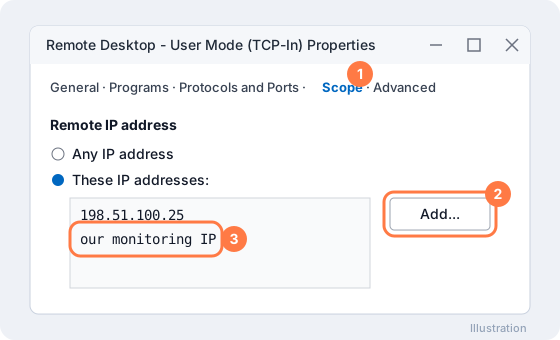
If you limit Remote Desktop to your own IP, also allow our monitoring address on the rule's Scope tab:
More on our blog
- How to Open Port in Windows Firewall
- How to block port in windows server
- How To Configure Firewall with UFW on Ubuntu
Still stuck? Our team answers 24/7. Open a ticket or use live chat.