

Work on 5 Computers at Once: The Power of Multiple Chrome RDP
In today’s hyper-connected world, productivity is no longer limited by how powerful your personal device is—it’s defined by how efficiently you can access and manage computing resources across environments.
Imagine coding on a Linux machine, testing on Windows, running automation scripts, and monitoring dashboards—all at the same time, from a single browser.
That’s exactly what Multiple Chrome RDP by HOMERDP enables.
This isn’t just remote desktop access—it’s a shift toward parallel computing workflows, where one user can effectively operate multiple systems simultaneously.
In this deep-dive, we’ll explore:
- What Multiple Chrome RDP is
- How it works technically
- Step-by-step usage
- Performance and productivity gains
- Real-world applications
- Why it represents the future of computing
What Is Multiple Chrome RDP?
Multiple Chrome RDP is a browser-based remote desktop solution that allows users to:
Run and manage multiple remote desktops inside Google Chrome tabs
Instead of relying on traditional clients like Microsoft Remote Desktop, this system works entirely through a web interface.
Key Concept:
- Each browser tab = one independent remote desktop session
- Multiple tabs = multiple computers
Result: You can literally work on 5 (or more) computers at once.
The Technology Behind It
To understand why this is powerful, let’s break down how it works.
Traditional RDP Model
- One client → One remote system
- Limited multitasking
- Heavy dependency on installed software
Chrome-Based RDP Model (HOMERDP)
- Browser acts as the client
- Remote servers handle computation
- Sessions stream via web protocols
Core Components:
- Remote server (Windows/Linux)
- Web-based RDP interface
- Streaming engine (input/output sync)
- Secure connection layer
This architecture enables scalability and flexibility unmatched by traditional setups.
Step-by-Step: How to Work on Multiple Systems
Let’s walk through the actual workflow.
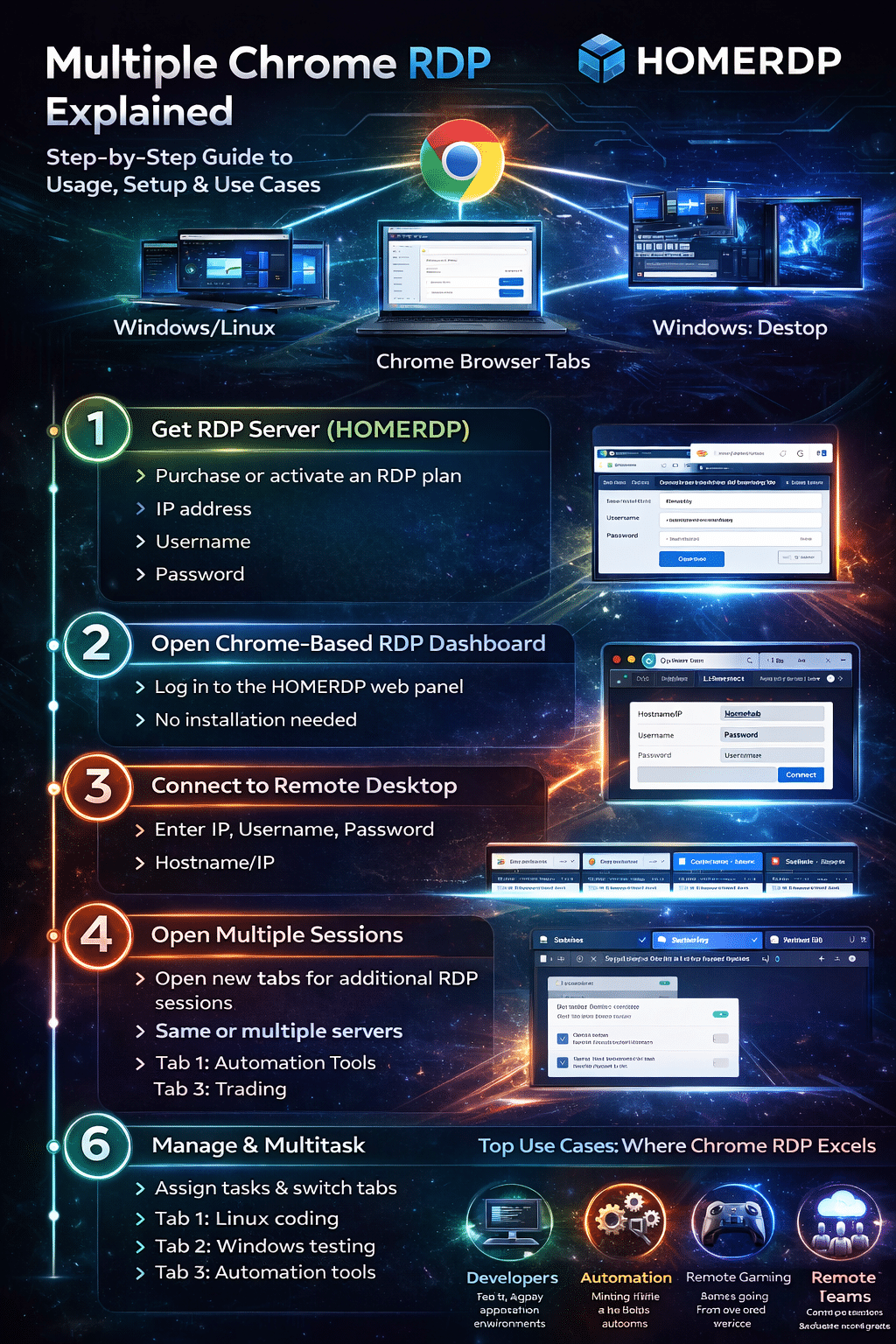
Step 1: Get Your RDP Environment Ready
Start by setting up your remote machines via HOMERDP.
You’ll receive:
- IP address
- Username
- Password
These act as your access keys to each system.
Step 2: Open the Chrome-Based Dashboard
- Launch Chrome
- Log into your HOMERDP panel
- Access the web RDP interface
No downloads. No installations.
Step 3: Connect to Your First Machine
- Enter credentials
- Click connect
Your remote desktop loads inside the browser.
Step 4: Multiply Your Sessions
Now the real power begins:
- Open a new tab
- Connect to another system
- Repeat
Within minutes, you can have:
- 3
- 5
- Even 10 systems running simultaneously
Step 5: Optimize for Performance
To ensure smooth operation:
- Use stable internet (≥ 20 Mbps recommended)
- Enable Chrome hardware acceleration
- Limit unnecessary background tabs
This minimizes latency and maximizes responsiveness.
Step 6: Organize Your Workflow
Assign specific tasks per tab:
- Tab 1 → Development
- Tab 2 → Testing
- Tab 3 → Automation
- Tab 4 → Monitoring
- Tab 5 → Backup/secondary tasks
You’ve now created a multi-system workstation inside a browser.
Productivity Gains: A Data-Driven Perspective
The biggest advantage of Multiple Chrome RDP is parallel execution.
Traditional Workflow:
- Sequential task handling
- Frequent switching
- Idle time between processes
With Multiple Chrome RDP:
- Simultaneous task execution
- Reduced context switching
- Higher output per hour
Estimated Impact:
- 30–50% faster task completion
- Reduced switching overhead
- Better resource utilization
For professionals, this directly translates into higher efficiency and output.
Real-World Use Cases
1. Developers & Engineers
Run full-stack workflows simultaneously:
- Linux server for backend
- Windows system for UI testing
- Database server in another tab
No need for multiple physical devices.
2. Digital Marketing & Automation
- Manage multiple accounts
- Run automation tools
- Monitor campaigns in real time
Parallel sessions = faster campaign execution.
3. Remote Gaming & Performance Testing
Combine:
- High-performance remote machines
- Lightweight local device
Play or test games without expensive hardware.
4. Students & Learners
- Access powerful systems remotely
- Practice coding, simulations, or design
Democratizes access to high-end computing.
5. Businesses & Remote Teams
- Centralized infrastructure
- Distributed workforce
Employees log in from anywhere, reducing IT costs.
Why Multiple Chrome RDP Is a Game-Changer
1. Browser = Operating System
Your browser becomes:
- Workspace
- Control center
- Access point
No dependency on local OS.
2. Hardware Independence
- Low-end device + high-end remote system
Massive cost savings.
3. Infinite Scalability
- Add more sessions as needed
Scale your workflow instantly.
4. True Multitasking
Unlike traditional multitasking:
- You’re not switching tasks
- You’re running them simultaneously
This is parallel computing for individuals.
Challenges & Considerations
While powerful, it’s not perfect.
Internet Dependency
- Requires stable connection
- Poor network = lag
Bandwidth Usage
- Multiple sessions consume data
Resource Management
- Too many sessions may overload system
Balance is key.
Security Best Practices
When working with multiple remote systems:
- Use strong passwords
- Enable encrypted sessions
- Avoid public Wi-Fi
- Log out of inactive sessions
Security becomes even more important at scale.

The Future of Computing
Multiple Chrome RDP is not just a tool—it’s a glimpse into the future.
Emerging Trends:
- Cloud-first computing
- Remote GPU systems
- Browser-based workflows
- OS-independent environments
The shift is clear: From owning machines → to accessing power on demand
Final Verdict
So, can you really work on 5 computers at once?
Yes—and efficiently.
With HOMERDP Multiple Chrome RDP, you can:
- Run multiple systems in parallel
- Increase productivity significantly
- Reduce hardware dependency
- Work from anywhere
Closing Thought
The definition of a “computer” is evolving.
It’s no longer a physical device sitting on your desk.
It’s a network of systems you can access anytime, anywhere.
And with Multiple Chrome RDP, you’re no longer limited to one machine.
You control many—simultaneously.
EXPLORE MORE ; Why antiX 26 is Perfect for GPU RDP Servers in 2026
READ OUR BLOGS