Managing Services with systemctl on Linux
Here’s a complete draft for your blog:
Managing Services with systemctl on Linux
In modern Linux distributions, systemd has become the standard init system that manages services and system processes. The command-line tool systemctl is used to interact with systemd, allowing administrators to start, stop, enable, disable, and monitor services efficiently. Understanding how to use systemctl is essential for system administration.
What is systemctl?
systemctl is the primary tool used to control systemd. It helps you manage services (also called units), check their status, and configure whether they start automatically when the system boots.
Common systemctl Commands
1. Check Service Status
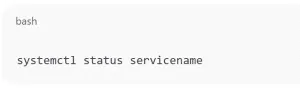
systemctl status servicename
Example:
systemctl status ssh
This shows whether the service is active, its recent logs, and PID information.
2. Start a Service
systemctl start servicename
This immediately starts the service without rebooting.
3. Stop a Service
systemctl stop servicename
This halts the service until you restart it.
4. Restart a Service
systemctl restart servicename
Use this when you need to reload the service with new configurations.
5. Enable a Service at Boot
systemctl enable servicename
This ensures the service will start automatically whenever the system boots.
6. Disable a Service at Boot
systemctl disable servicename
Prevents the service from starting automatically at boot.
7. Reload Service Without Restarting
systemctl reload servicename
This applies new configurations without fully restarting the service (if supported).
8. List All Services
systemctl list-units --type=service
Shows all loaded services and their states.
Best Practices for Service Management
- Always check the status before restarting a critical service.
- Use
enableonly for services that must run at startup. - Regularly monitor system logs with
journalctlto troubleshoot service issues.
Managing Services with systemctl on Linux (F.A.Q)
Frequently asked questions
What is the difference between start and enable in systemctl?
-
startlaunches the service immediately. -
enableensures the service starts automatically at boot.
How do I check if a service is enabled at startup?
systemctl is-enabled servicename
Can I manage all services at once?
Yes, you can use commands like systemctl list-units --type=service to see all services and manage them collectively.
How do I see logs for a service?
journalctl -u servicename
Run it on HomeRDP
Linux VPS
KVM Linux VPS with root access and NVMe storage.