If you are looking for computers that are capable of Virtualization, then you must first know if your Windows PC is based on Intel or AMD processors or not. Well, these two processors come with the capability to manage virtualization using a pair of integrated CPU codes. For the CPU codes to be active, BIOS needs to be turned on because it’s turned off by default. So, if you want to check if your CPU supports virtualization you must first check your PC is using which type of CPU. To know if virtualization is enabled in your CPU, you can follow the below method.
Solution: By using Task Manager
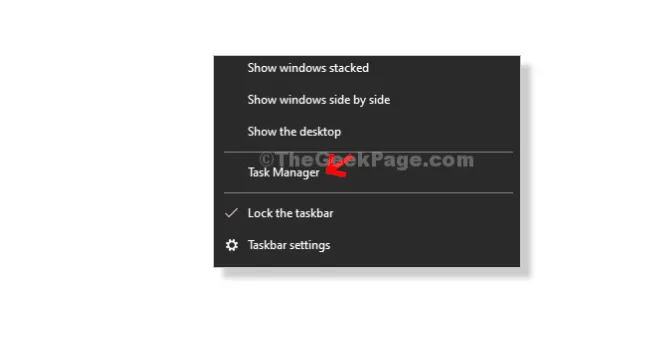
Step 1: Right Click on Taskbar and Click on Task Manager From Context Menu.
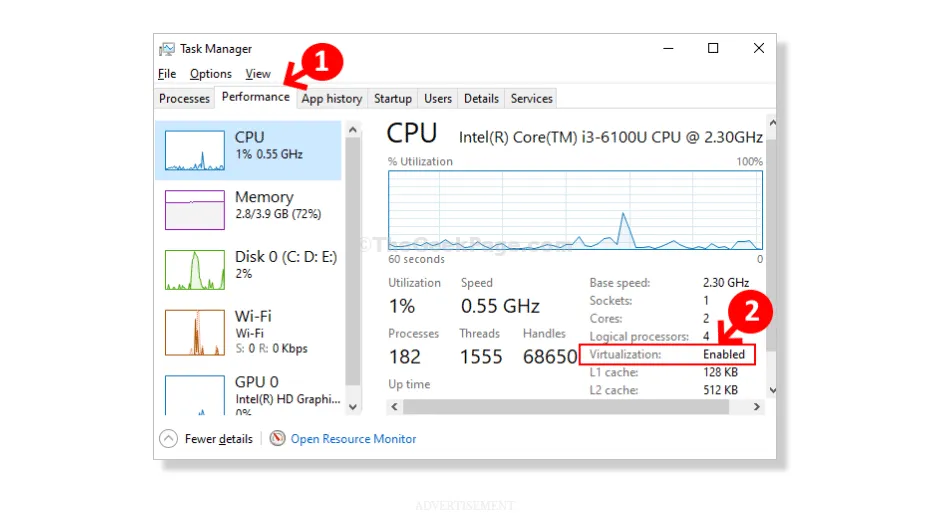
Step 2. In the Task Manager you have to click on Performance Tab. Under CPU details on the right-side of the screen check the Virtualization section. It will show if it is Enabled or Disabled. Here, we can see that it is Enabled.
This is the way through which you can check virtualization is Enabled or Disabled in Your Pc.